Design Patterns Explained Simply: Complete Guide with Real Examples (Beginner to Advanced)
Ever noticed how large applications like Amazon, Uber, or Netflix handle complexity so smoothly? It’s not magic — it’s smart design.
Behind the scenes, developers use design patterns to solve common problems in a structured and reusable way.
If you’re a beginner or preparing for interviews, this guide will help you understand design patterns in the simplest way possible — with real-life examples and clear explanations.
🧠 What Are Design Patterns?
Design patterns are proven solutions to common programming problems.
Instead of reinventing the wheel every time, developers follow these patterns to build scalable and maintainable systems.
👉 Think of them as “templates” for solving problems.
---❓ Why Are Design Patterns Important?
- Make code easier to understand
- Improve reusability
- Help in building scalable systems
- Important for coding interviews
📦 Types of Design Patterns
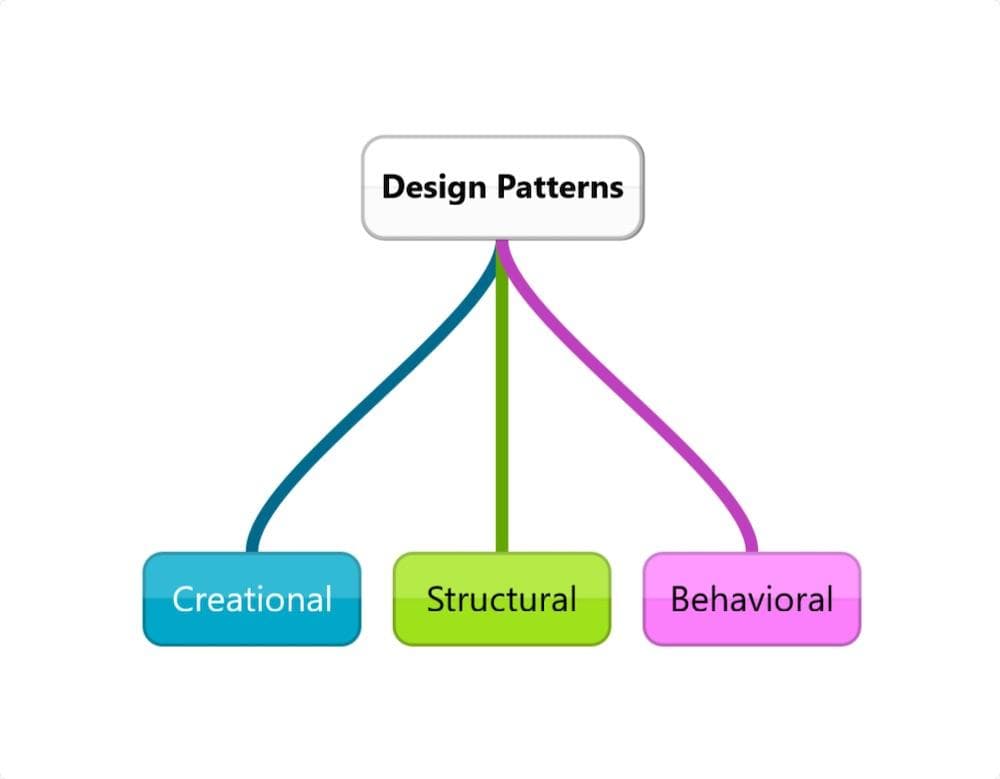
Design patterns are divided into three main categories:
- Creational → Object creation
- Structural → Object structure
- Behavioral → Communication between objects
🟡 CREATIONAL DESIGN PATTERNS
These patterns deal with how objects are created.
1. Singleton Pattern
Ensures only one instance of a class exists.

Example: Database connection
class Singleton {
  private static instance;

  private constructor() {}

  public static getInstance() {
    if (!this.instance) {
      this.instance = new Singleton();
    }
    return this.instance;
  }
}
👉 Real life: Only one CEO in a company.
---2. Factory Pattern
Creates objects without exposing the creation logic.
Example: Payment system (UPI, Card, Wallet)
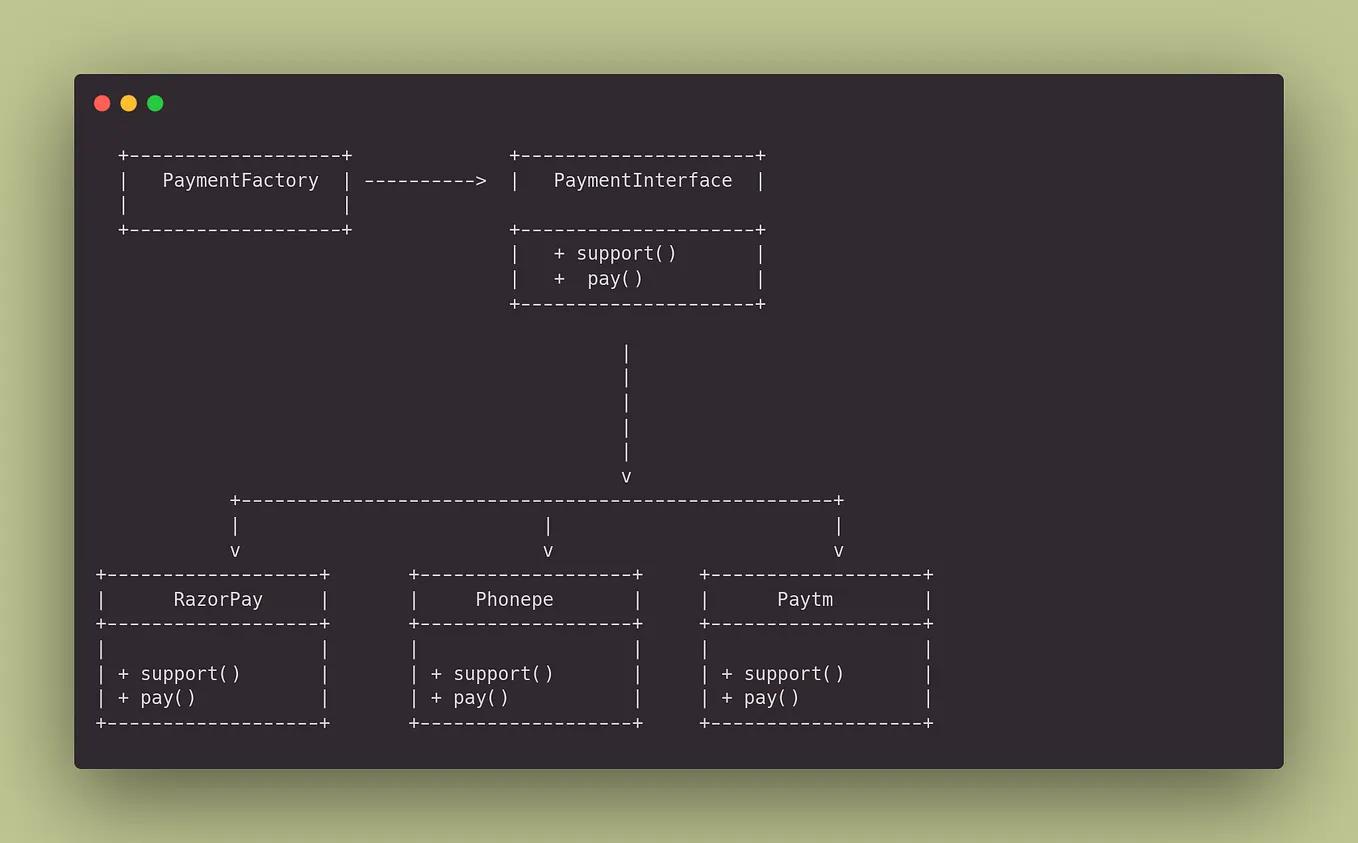
class PaymentFactory {
  static create(type) {
    if (type === "UPI") return new UPI();
    if (type === "CARD") return new Card();
  }
}
👉 Real life: Car factory produces different cars.
---🧩 Builder Pattern — Simple Explanation
Builder Pattern is used to create complex objects step by step instead of using a large constructor.
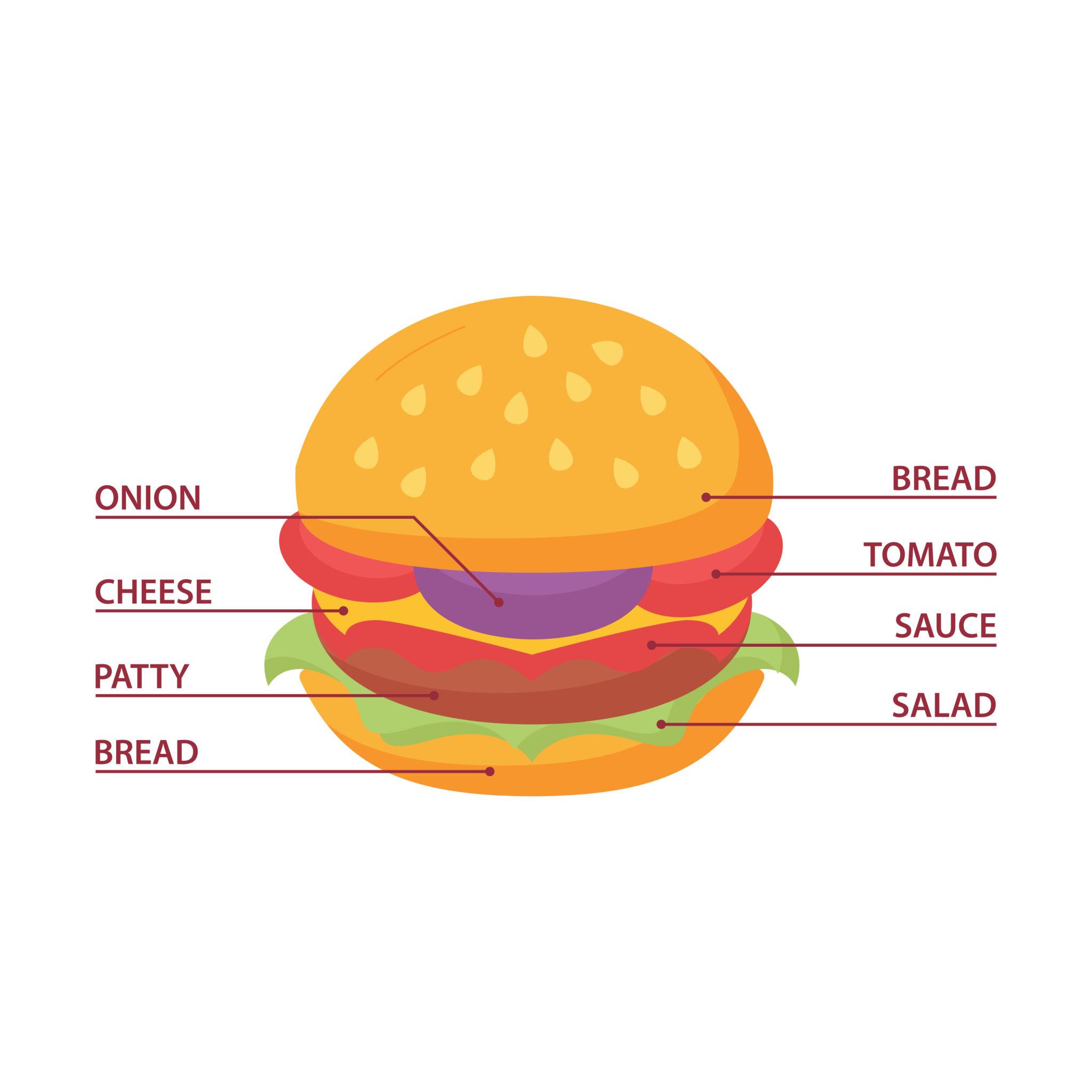
👉 Think of it like ordering a custom burger 🍔 — you add ingredients one by one.
🍔 Real-Life Example: Custom Burger

Instead of writing confusing code like this:
Burger b = new Burger(true, true, false, true);
❌ Hard to understand what each value means
Use Builder Pattern:
Burger b = new BurgerBuilder()
              .addCheese()
              .addLettuce()
              .addTomato()
              .build();
✅ Easy to read
✅ Flexible
✅ Clean code
💡 Why Use Builder Pattern?
- When object has many optional fields
- When constructor becomes too complex
- To improve readability and maintainability
🛠️ Code Example
🍔 Burger Class
class Burger {
    private boolean cheese;
    private boolean lettuce;
    private boolean tomato;

    public Burger(boolean cheese, boolean lettuce, boolean tomato) {
        this.cheese = cheese;
        this.lettuce = lettuce;
        this.tomato = tomato;
    }

    public String toString() {
        return "Burger with " +
            (cheese ? "Cheese " : "") +
            (lettuce ? "Lettuce " : "") +
            (tomato ? "Tomato" : "");
    }
}
🔨 Builder Class
class BurgerBuilder {
    private boolean cheese;
    private boolean lettuce;
    private boolean tomato;

    public BurgerBuilder addCheese() {
        this.cheese = true;
        return this;
    }

    public BurgerBuilder addLettuce() {
        this.lettuce = true;
        return this;
    }

    public BurgerBuilder addTomato() {
        this.tomato = true;
        return this;
    }

    public Burger build() {
        return new Burger(cheese, lettuce, tomato);
    }
}
🚀 How It Works
- Create Builder →
new BurgerBuilder() - Add items →
.addCheese().addLettuce() - Build final object →
.build()
🏗️ Real-World Example: API Request

Request req = new RequestBuilder()
                .setUrl("api.com")
                .setMethod("POST")
                .addHeader("Auth", "token")
                .setBody("data")
                .build();
👉 Much cleaner than using a large constructor with many parameters.
🎯 One-Line Definition
Builder Pattern = Creating complex objects step by step in a readable way.
⚡ Interview Tip
Q: When to use Builder Pattern?
A: When an object has many optional fields and constructors become messy.
🧬 Prototype Pattern
Prototype Pattern is used to create new objects by copying (cloning) an existing object instead of creating from scratch.
👉 Think of it like making a photocopy of a document 📄 — faster than writing it again.
📄 Real-Life Example: Photocopy

Instead of creating a new object every time (which may be slow or complex), you simply clone an existing one.
💡 Why Use Prototype Pattern?
- Object creation is expensive (time/memory)
- You need many similar objects
- Want to avoid repeating initialization logic
🛠️ Code Example
📦 Prototype Class
class Burger implements Cloneable {
    String type;

    public Burger(String type) {
        this.type = type;
    }

    public Object clone() throws CloneNotSupportedException {
        return super.clone();
    }
}
🚀 Usage
Burger original = new Burger("Cheese Burger");

// Clone the object
Burger copy = (Burger) original.clone();

System.out.println(copy.type); // Cheese Burger
⚙️ How It Works
- Create original object
- Call
clone()method - Get a new copied object
🏗️ Real-World Example
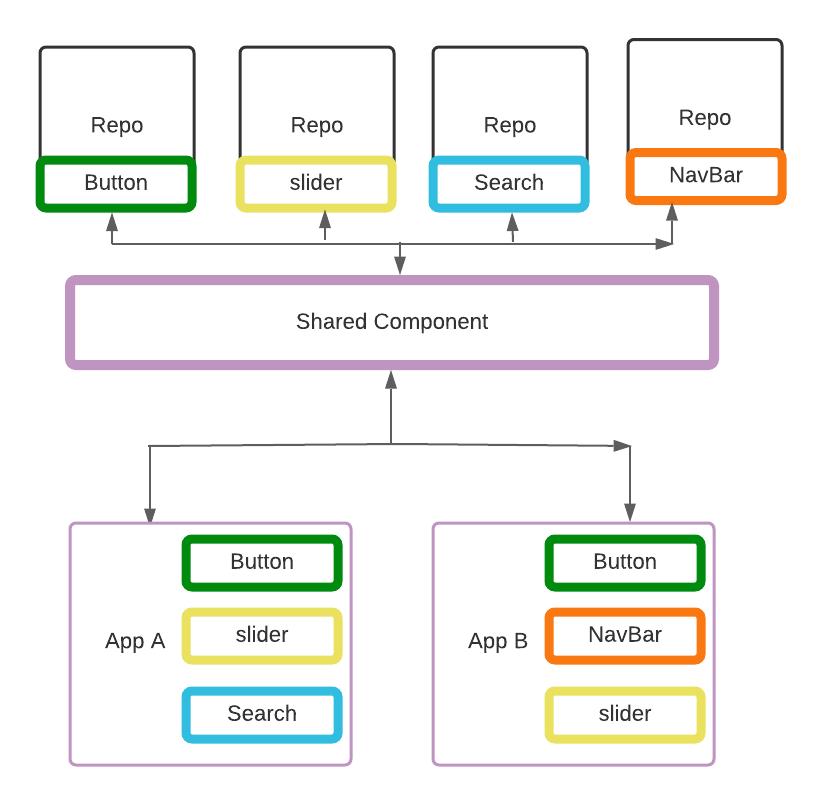
🎮 In games: Creating multiple characters with same properties 📦 In apps: Copying UI components or templates 🛒 In e-commerce: Duplicate product configurations
🎯 One-Line Definition
Prototype Pattern = Create new objects by copying existing ones.
⚡ Interview Tip
Q: When to use Prototype Pattern?
A: When object creation is costly and you need many similar objects.
🔵 STRUCTURAL DESIGN PATTERNS
These focus on how classes and objects are organized.
🔌 Adapter Pattern
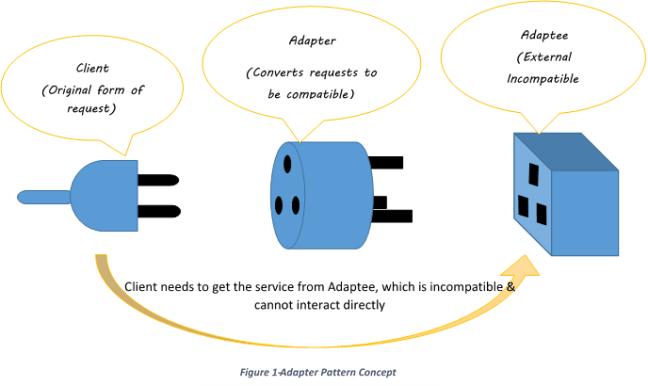
Adapter Pattern is used to convert one interface into another so that two incompatible systems can work together.
👉 Think of it like a mobile charger adapter — it allows your charger to fit into different types of sockets.
🔌 Real-Life Example: Charger Adapter

Different countries have different socket types, but your charger remains the same. 👉 The adapter converts the plug so it can work anywhere.
💡 Why Use Adapter Pattern?
- When two systems have different interfaces
- To make old (legacy) code work with new code
- To reuse existing classes without modifying them
🛠️ Code Example
⚡ Existing System (Old Interface)
class OldCharger {
    public void chargeWithRoundPin() {
        System.out.println("Charging with round pin");
    }
}
🔌 Target Interface (New Requirement)
interface NewCharger {
    void chargeWithUSB();
}
🔄 Adapter Class
class ChargerAdapter implements NewCharger {
    private OldCharger oldCharger;

    public ChargerAdapter(OldCharger oldCharger) {
        this.oldCharger = oldCharger;
    }

    public void chargeWithUSB() {
        oldCharger.chargeWithRoundPin();
    }
}
🚀 Usage
OldCharger oldCharger = new OldCharger();
NewCharger adapter = new ChargerAdapter(oldCharger);

adapter.chargeWithUSB();
⚙️ How It Works
- Client expects
NewCharger - Adapter converts request
- Old system executes the work
🏗️ Real-World Software Example
🌐 Payment gateway adapters (UPI, Card, Wallet)
📦 Third-party API integrations
🔄 Data format conversion (XML → JSON)
🎯 One-Line Definition
Adapter Pattern = Making incompatible systems work together.
⚡ Interview Tip
Q: When to use Adapter Pattern?
A: When two systems cannot communicate directly due to different interfaces.
🎭 Facade Pattern
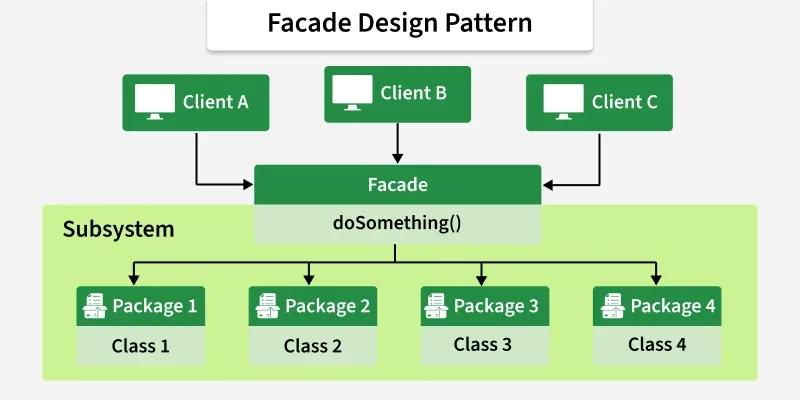
Facade Pattern provides a simple interface to a complex system.
👉 Instead of dealing with multiple steps and systems, you interact with just one simple interface.
🎬 Real-Life Example: Booking a Movie Ticket
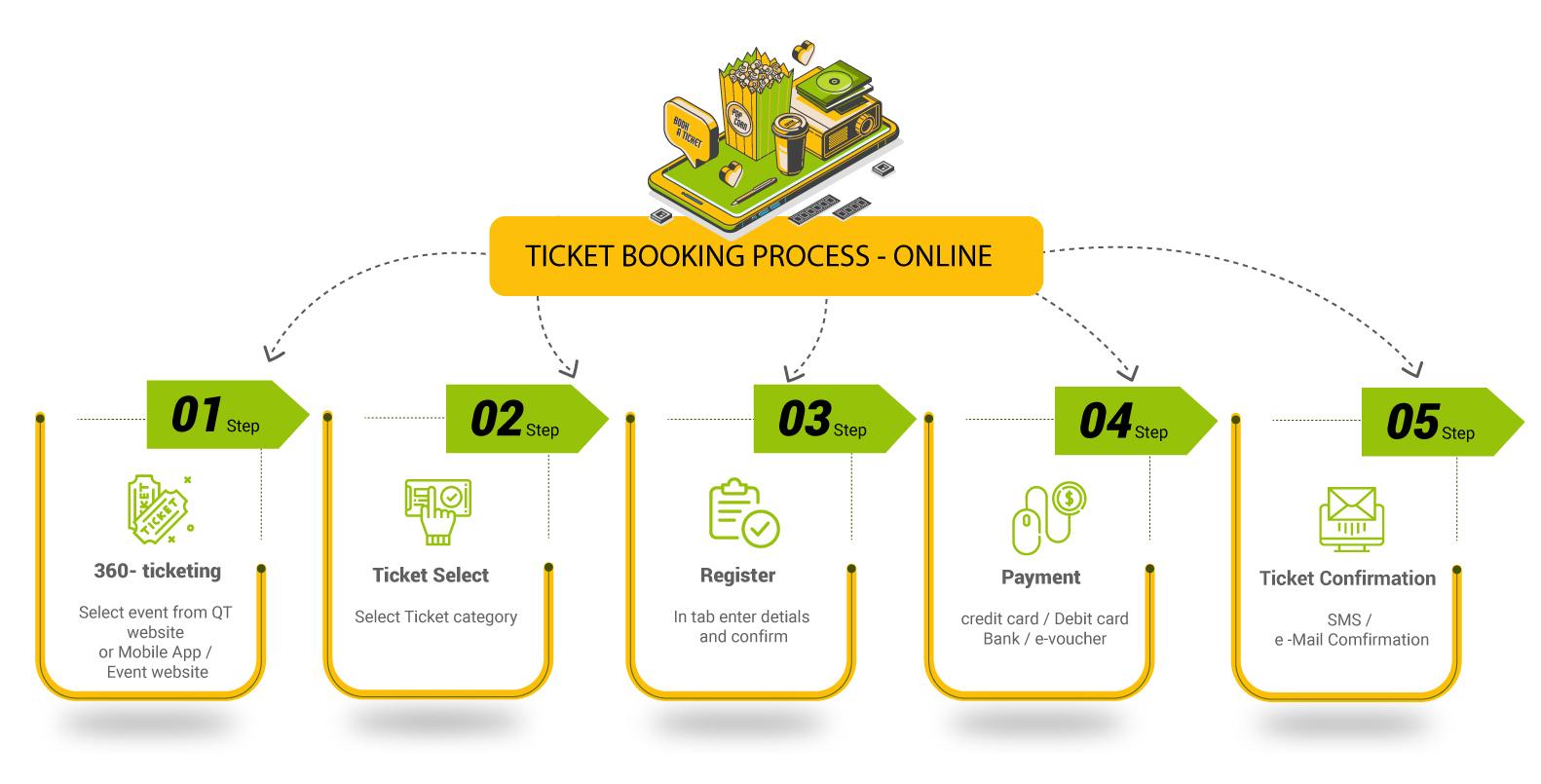
When you book a movie ticket, you just click a few buttons:
- Select movie 🎥
- Choose seats 💺
- Make payment 💳
👉 But behind the scenes, many systems are working:
- Seat availability system
- Payment gateway
- Notification system
Facade = Single interface that handles everything internally
💡 Why Use Facade Pattern?
- To hide complex logic
- To provide a clean and simple API
- To reduce dependencies between systems
🛠️ Code Example
🎬 Complex Subsystems
class SeatBooking {
    void bookSeat() {
        System.out.println("Seat booked");
    }
}

class Payment {
    void makePayment() {
        System.out.println("Payment successful");
    }
}

class Notification {
    void sendTicket() {
        System.out.println("Ticket sent via SMS/Email");
    }
}
🎭 Facade Class
class MovieBookingFacade {
    private SeatBooking seatBooking = new SeatBooking();
    private Payment payment = new Payment();
    private Notification notification = new Notification();

    public void bookMovie() {
        seatBooking.bookSeat();
        payment.makePayment();
        notification.sendTicket();
    }
}
🚀 Usage
MovieBookingFacade facade = new MovieBookingFacade();
facade.bookMovie();
⚙️ How It Works
- User calls one method →
bookMovie() - Facade handles all internal systems
- User gets final result without complexity
🏗️ Real-World Software Example
🌐 API Gateway in microservices
📦 Payment systems (UPI, Card, Wallet handled internally)
🛒 E-commerce checkout system
🎯 One-Line Definition
Facade Pattern = One simple interface to handle complex systems.
⚡ Interview Tip
Q: When to use Facade Pattern?
A: When a system is complex and you want to expose a simple interface to the client.
🍕 Decorator Pattern
Decorator Pattern is used to add extra functionality to an object without modifying its original code.
👉 Think of it like adding toppings to a pizza 🍕 — base pizza stays same, you just add extras.
🍕 Real-Life Example: Pizza Toppings

Start with a plain pizza:
Plain Pizza
Now add toppings:
Pizza + Cheese
Pizza + Cheese + Olives
Pizza + Cheese + Olives + Mushroom
👉 You are adding features without changing the base pizza.
💡 Why Use Decorator Pattern?
- Add features dynamically at runtime
- Avoid modifying existing code
- Follow Open/Closed Principle (open for extension, closed for modification)
🛠️ Code Example
🍕 Base Interface
interface Pizza {
    String getDescription();
    int getCost();
}
🍞 Plain Pizza
class PlainPizza implements Pizza {
    public String getDescription() {
        return "Plain Pizza";
    }

    public int getCost() {
        return 100;
    }
}
🧩 Decorator Class
abstract class PizzaDecorator implements Pizza {
    protected Pizza pizza;

    public PizzaDecorator(Pizza pizza) {
        this.pizza = pizza;
    }
}
🧀 Cheese Topping
class CheeseDecorator extends PizzaDecorator {
    public CheeseDecorator(Pizza pizza) {
        super(pizza);
    }

    public String getDescription() {
        return pizza.getDescription() + ", Cheese";
    }

    public int getCost() {
        return pizza.getCost() + 20;
    }
}
🍄 Mushroom Topping
class MushroomDecorator extends PizzaDecorator {
    public MushroomDecorator(Pizza pizza) {
        super(pizza);
    }

    public String getDescription() {
        return pizza.getDescription() + ", Mushroom";
    }

    public int getCost() {
        return pizza.getCost() + 30;
    }
}
🚀 Usage
Pizza pizza = new PlainPizza();
pizza = new CheeseDecorator(pizza);
pizza = new MushroomDecorator(pizza);

System.out.println(pizza.getDescription());
System.out.println(pizza.getCost());
⚙️ How It Works
- Start with base object →
PlainPizza - Wrap it with decorators → Cheese, Mushroom
- Each decorator adds new behavior
🏗️ Real-World Software Example
📦 Java I/O Streams (BufferedReader, FileReader)
🌐 Middleware (Logging, Authentication)
🛒 Adding features like discounts, coupons in checkout
🎯 One-Line Definition
Decorator Pattern = Add new features without changing existing code.
⚡ Interview Tip
Q: When to use Decorator Pattern?
A: When you want to add functionality dynamically without modifying existing classes.
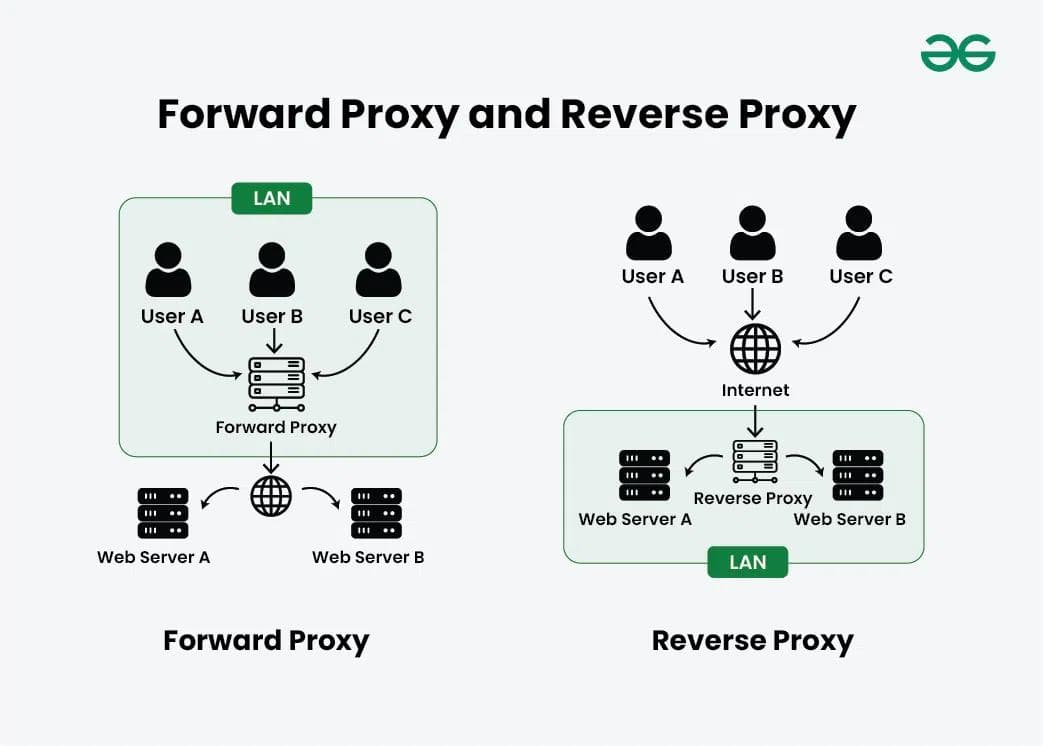
🏦 Proxy Pattern — Simple Explanation
Proxy Pattern is used to control access to an object.
👉 Instead of directly accessing the real object, you go through a proxy (middle layer).
🏧 Real-Life Example: ATM Machine
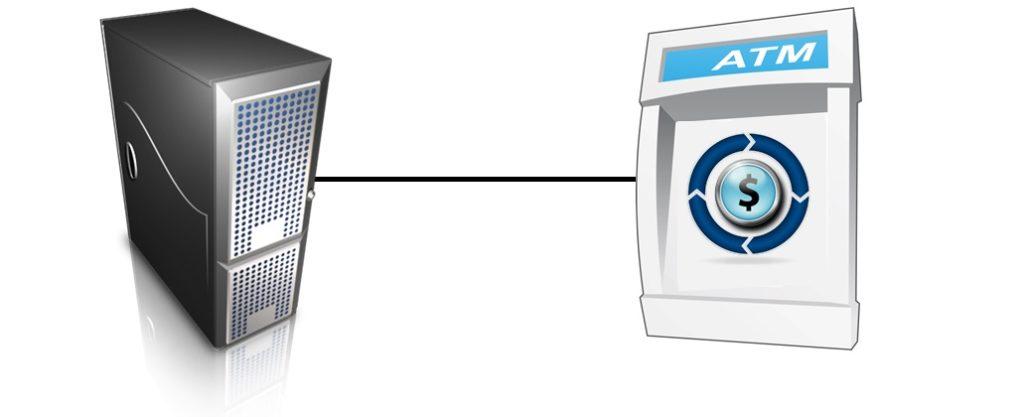
When you use an ATM:
- You don’t directly access the bank server ❌
- ATM acts as a proxy between you and the bank ✅
👉 ATM checks:
- Card validity 💳
- PIN authentication 🔐
- Balance availability 💰
Then it connects to the bank server and completes the transaction.
💡 Why Use Proxy Pattern?
- To control access (security, authentication)
- To add logging or caching
- To delay object creation (lazy loading)
🛠️ Code Example
🏦 Real Object
class BankAccount {
    public void withdraw() {
        System.out.println("Money withdrawn from bank");
    }
}
🔒 Proxy Class
class ATMProxy {
    private BankAccount bankAccount;

    public ATMProxy() {
        bankAccount = new BankAccount();
    }

    public void withdraw(String pin) {
        if (pin.equals("1234")) {
            bankAccount.withdraw();
        } else {
            System.out.println("Invalid PIN");
        }
    }
}
🚀 Usage
ATMProxy atm = new ATMProxy();
atm.withdraw("1234");
⚙️ How It Works
- User interacts with Proxy (ATM)
- Proxy checks conditions (PIN, access)
- Proxy forwards request to real object
🏗️ Real-World Software Example
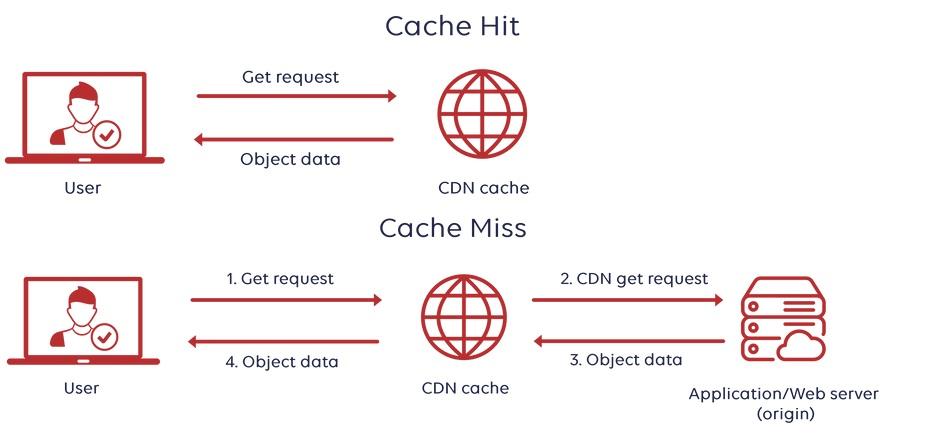
🌐 Proxy servers (Nginx, API Gateway)
⚡ Caching systems (CDN)
🔐 Authentication layers (security proxy)
🎯 One-Line Definition
Proxy Pattern = Control access to an object using a middle layer.
⚡ Interview Tip
Q: When to use Proxy Pattern?
A: When you want to control access, add security, or optimize performance without changing the original object.
🟣 BEHAVIORAL DESIGN PATTERNS
These define how objects communicate.
🔔 Observer Pattern — Simple Explanation
Observer Pattern is used when one object (subject) notifies multiple objects (observers) whenever its state changes.
👉 Think of it like YouTube notifications — when a creator uploads a video, all subscribers get notified.
📺 Real-Life Example: YouTube Notifications

When a creator uploads a video:
- Subscribers are registered (Observers)
- Channel is the Subject
- All subscribers get notified instantly 🔔
💡 Why Use Observer Pattern?
- When multiple objects depend on one object
- For event-driven systems (notifications, alerts)
- To keep systems loosely coupled
🛠️ Code Example
📢 Observer Interface
interface Observer {
    void update(String message);
}
📺 Subscriber Class
class Subscriber implements Observer {
    private String name;

    public Subscriber(String name) {
        this.name = name;
    }

    public void update(String message) {
        System.out.println(name + " received: " + message);
    }
}
📡 Subject (YouTube Channel)
import java.util.*;

class YouTubeChannel {
    private List<Observer> subscribers = new ArrayList<>();

    public void subscribe(Observer o) {
        subscribers.add(o);
    }

    public void unsubscribe(Observer o) {
        subscribers.remove(o);
    }

    public void uploadVideo(String title) {
        notifySubscribers(title);
    }

    private void notifySubscribers(String message) {
        for (Observer o : subscribers) {
            o.update("New Video: " + message);
        }
    }
}
🚀 Usage
YouTubeChannel channel = new YouTubeChannel();

Subscriber user1 = new Subscriber("Aman");
Subscriber user2 = new Subscriber("Rahul");

channel.subscribe(user1);
channel.subscribe(user2);

channel.uploadVideo("Design Patterns Explained");
⚙️ How It Works
- Observers subscribe to subject
- State changes (new video uploaded)
- All observers get notified automatically
🏗️ Real-World Software Example
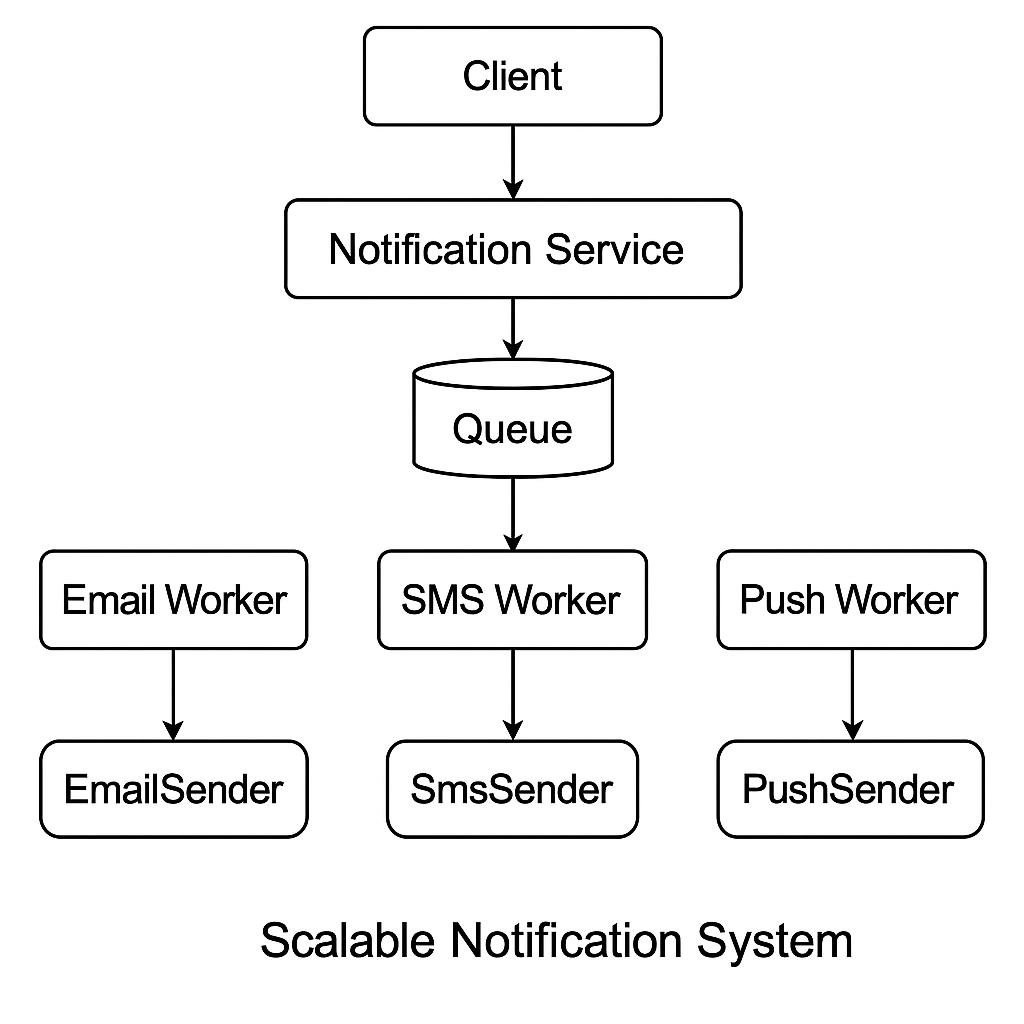
📈 Stock price alerts
📱 Push notifications (apps)
🛒 Order status updates (e-commerce)
🎯 One-Line Definition
Observer Pattern = One-to-many notification system.
⚡ Interview Tip
Q: When to use Observer Pattern?
A: When multiple objects need to be updated automatically when one object changes.
💳 Strategy Pattern — Simple Explanation
Strategy Pattern allows you to choose behavior (algorithm) at runtime.
👉 Instead of hardcoding one way to do something, you can switch between multiple options.
💳 Real-Life Example: Payment Method Selection
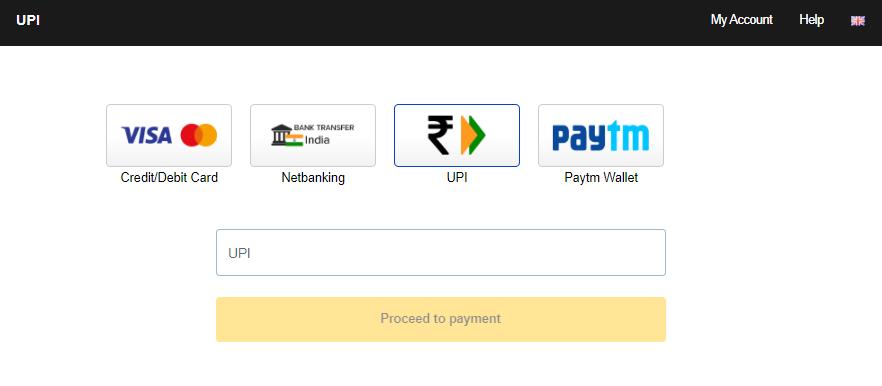
When you pay online, you can choose:
- UPI 📱
- Credit Card 💳
- Net Banking 🏦
👉 The system uses different strategies based on your selection.
💡 Why Use Strategy Pattern?
- To switch behavior at runtime
- To avoid large
if-elseorswitchstatements - To make code flexible and easy to extend
🛠️ Code Example
💡 Strategy Interface
interface PaymentStrategy {
    void pay(int amount);
}
📱 UPI Payment
class UPI implements PaymentStrategy {
    public void pay(int amount) {
        System.out.println("Paid via UPI: " + amount);
    }
}
💳 Credit Card Payment
class CreditCard implements PaymentStrategy {
    public void pay(int amount) {
        System.out.println("Paid via Credit Card: " + amount);
    }
}
🏦 Context Class
class PaymentContext {
    private PaymentStrategy strategy;

    public void setStrategy(PaymentStrategy strategy) {
        this.strategy = strategy;
    }

    public void pay(int amount) {
        strategy.pay(amount);
    }
}
🚀 Usage
PaymentContext context = new PaymentContext();

// Choose UPI
context.setStrategy(new UPI());
context.pay(1000);

// Switch to Credit Card
context.setStrategy(new CreditCard());
context.pay(2000);
⚙️ How It Works
- Define multiple strategies (UPI, Card, etc.)
- Select strategy at runtime
- Execute selected behavior
🏗️ Real-World Software Example
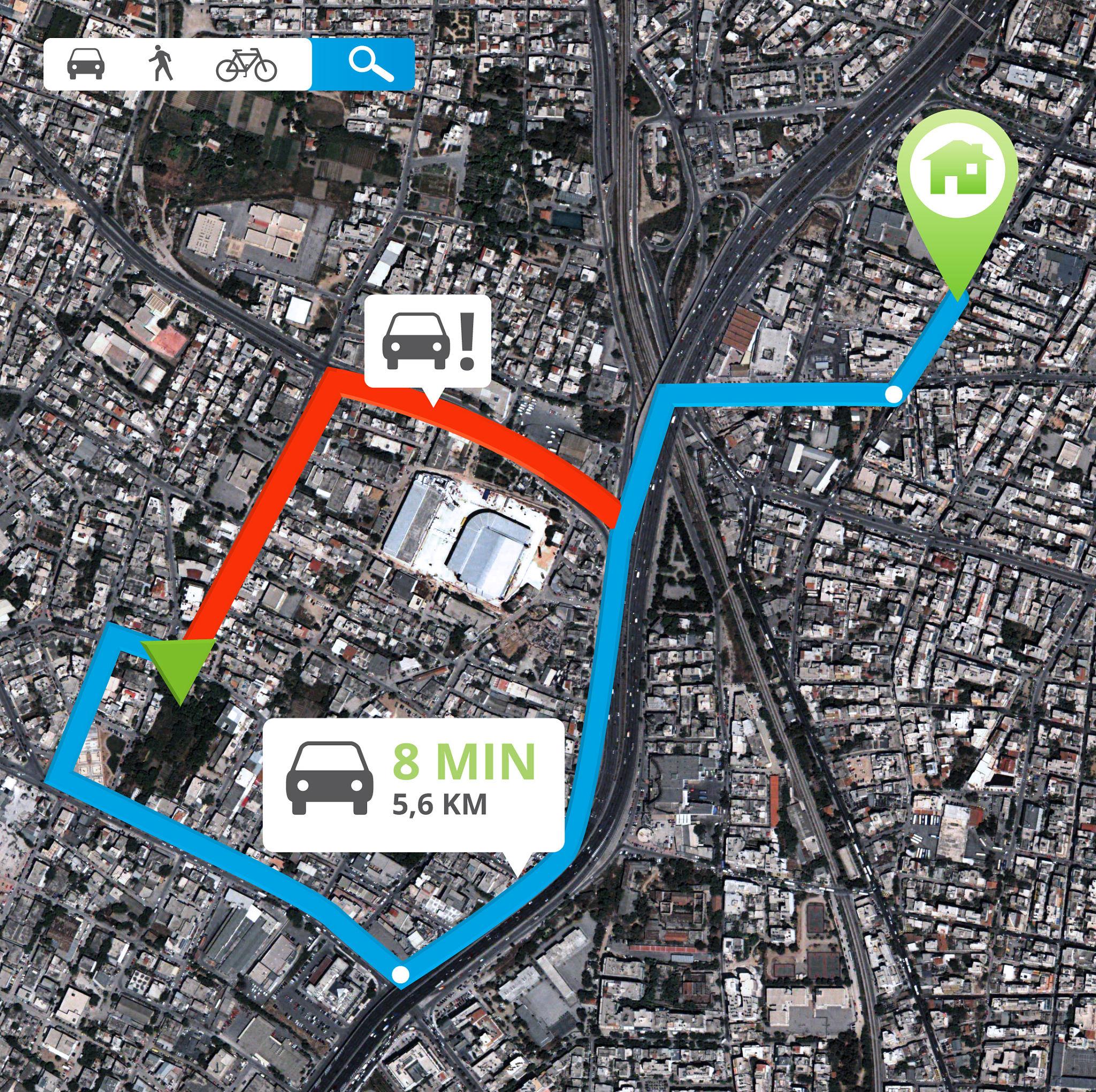
📦 Sorting algorithms (QuickSort, MergeSort)
🗺️ Route selection (fastest, shortest path)
💰 Payment systems (UPI, Card, Wallet)
🎯 One-Line Definition
Strategy Pattern = Choose behavior at runtime.
⚡ Interview Tip
Q: When to use Strategy Pattern?
A: When you have multiple ways to perform a task and want to switch between them dynamically.
🎮 Command Pattern — Simple Explanation
Command Pattern is used to encapsulate a request as an object, so you can parameterize, queue, or execute requests later.
👉 Instead of directly calling an action, you wrap it inside a command object.
🎮 Real-Life Example: Remote Control
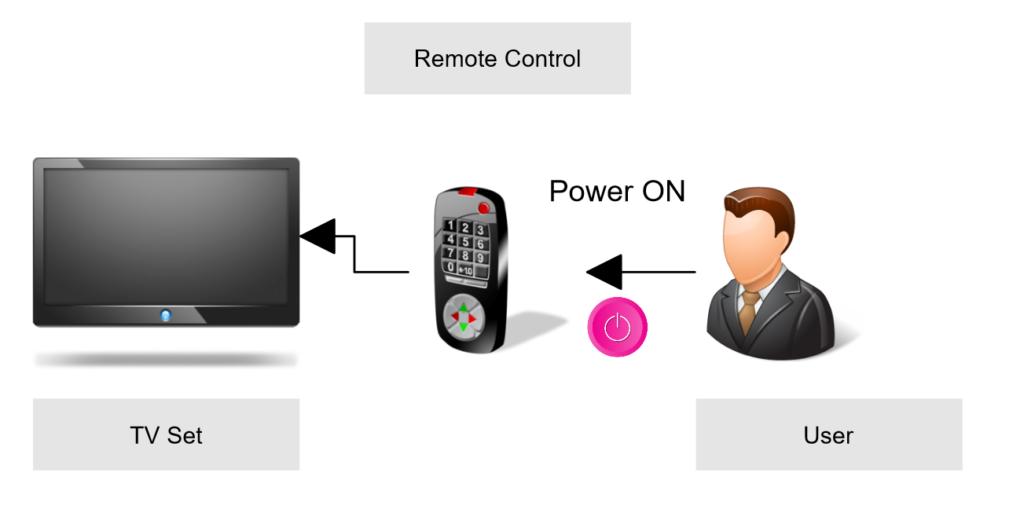
When you press a button on a remote:
- You don’t directly control the TV ❌
- Remote sends a command to the device ✅
👉 Each button = a command (ON, OFF, Volume Up)
💡 Why Use Command Pattern?
- To decouple sender and receiver
- To support undo/redo operations
- To queue or log requests
🛠️ Code Example
📦 Command Interface
interface Command {
    void execute();
}
📺 Receiver (TV)
class TV {
    public void turnOn() {
        System.out.println("TV is ON");
    }

    public void turnOff() {
        System.out.println("TV is OFF");
    }
}
🔘 Concrete Command
class TurnOnCommand implements Command {
    private TV tv;

    public TurnOnCommand(TV tv) {
        this.tv = tv;
    }

    public void execute() {
        tv.turnOn();
    }
}
🎮 Invoker (Remote)
class RemoteControl {
    private Command command;

    public void setCommand(Command command) {
        this.command = command;
    }

    public void pressButton() {
        command.execute();
    }
}
🚀 Usage
TV tv = new TV();
Command onCommand = new TurnOnCommand(tv);

RemoteControl remote = new RemoteControl();
remote.setCommand(onCommand);
remote.pressButton();
⚙️ How It Works
- Create command object (TurnOnCommand)
- Set it in invoker (Remote)
- Execute command → receiver performs action
🏗️ Real-World Software Example
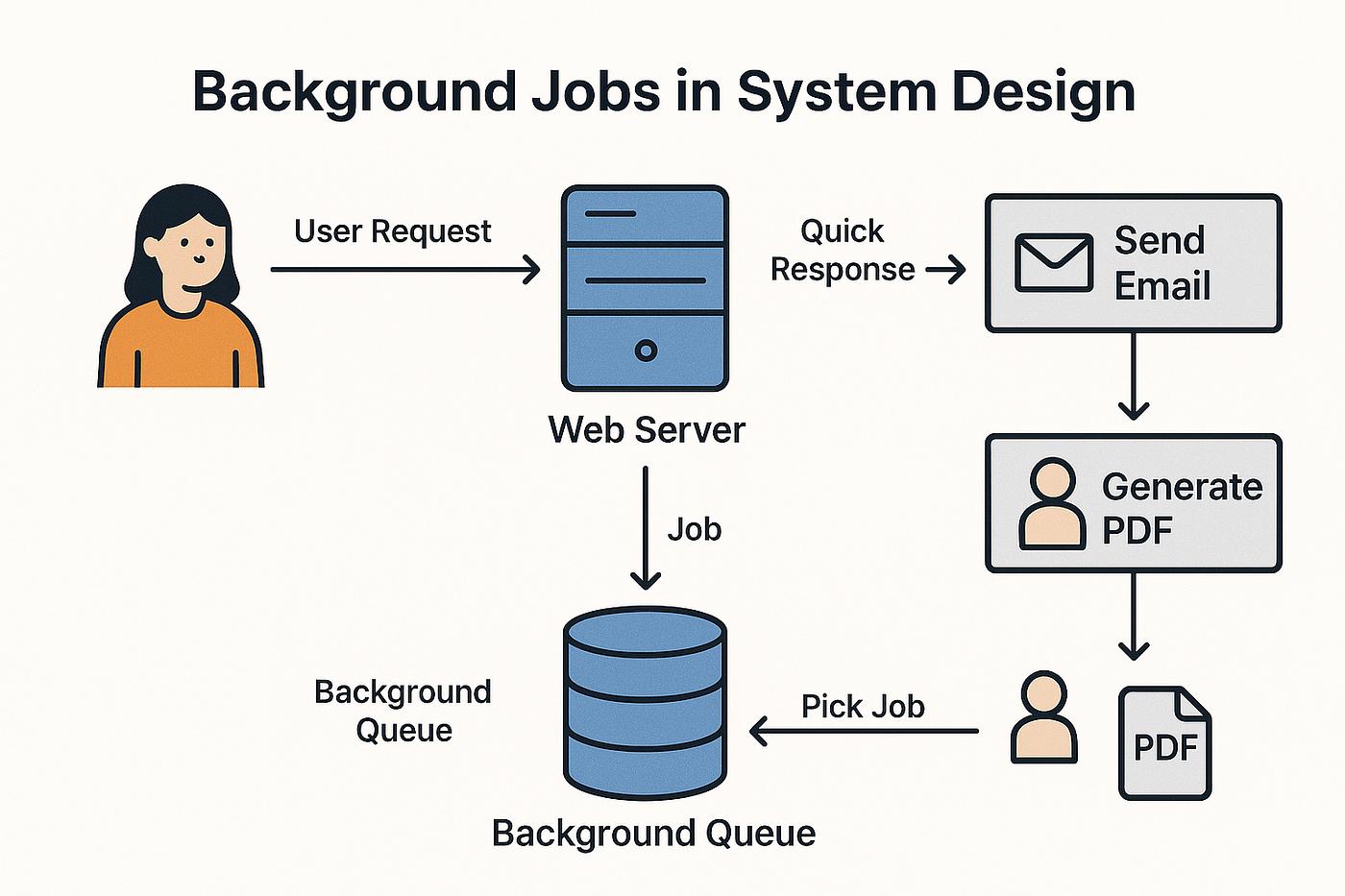
📝 Undo/Redo operations (text editors)
📦 Job queues (task scheduling)
🖱️ UI buttons triggering actions
🎯 One-Line Definition
Command Pattern = Wrap a request into an object.
⚡ Interview Tip
Q: When to use Command Pattern?
A: When you want to decouple request sender from receiver and support features like undo/redo or queuing.
🔗 Chain of Responsibility — Simple Explanation
Chain of Responsibility Pattern passes a request through a chain of handlers until one of them handles it.
👉 Each handler gets a chance to process the request. If it can’t, it forwards it to the next.
📞 Real-Life Example: Customer Support Escalation
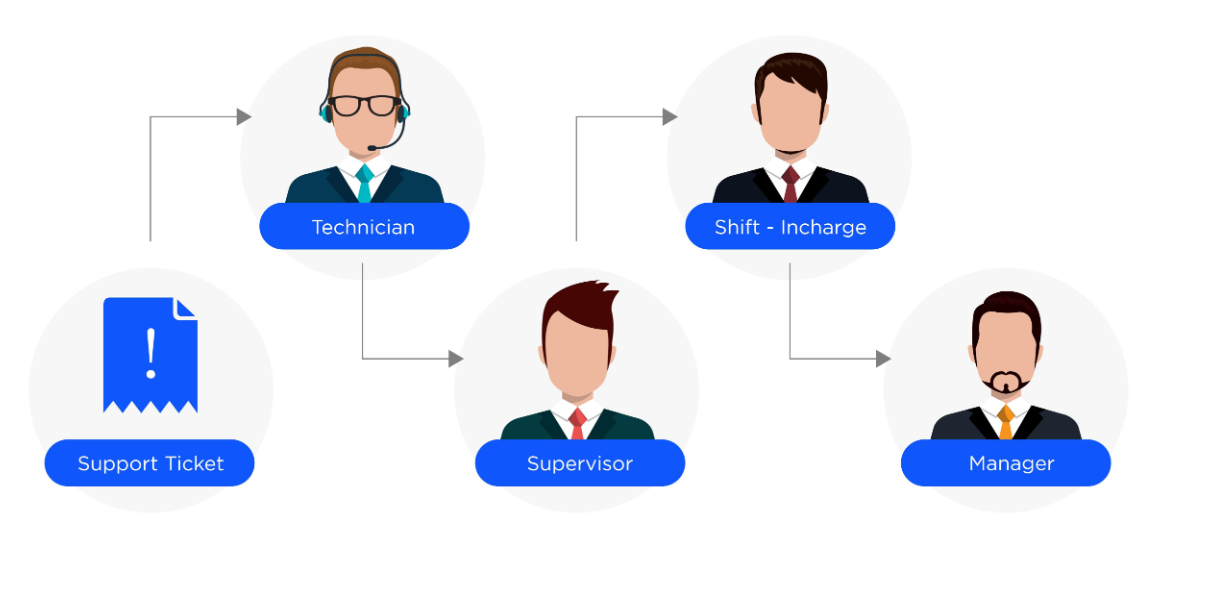
When you raise a support issue:
- Level 1 Support tries to solve it
- If not solved → passed to Level 2
- If still not solved → goes to Manager
👉 Request moves step-by-step until someone handles it.
💡 Why Use Chain of Responsibility?
- To avoid tight coupling between sender and receiver
- To allow multiple handlers to process a request
- To make system flexible and scalable
🛠️ Code Example
📦 Handler Abstract Class
abstract class SupportHandler {
    protected SupportHandler next;

    public void setNext(SupportHandler next) {
        this.next = next;
    }

    public abstract void handleRequest(String issue);
}
👨💻 Level 1 Support
class Level1Support extends SupportHandler {
    public void handleRequest(String issue) {
        if (issue.equals("basic")) {
            System.out.println("Level 1 resolved the issue");
        } else if (next != null) {
            next.handleRequest(issue);
        }
    }
}
👨🔧 Level 2 Support
class Level2Support extends SupportHandler {
    public void handleRequest(String issue) {
        if (issue.equals("medium")) {
            System.out.println("Level 2 resolved the issue");
        } else if (next != null) {
            next.handleRequest(issue);
        }
    }
}
👨💼 Manager
class Manager extends SupportHandler {
    public void handleRequest(String issue) {
        if (issue.equals("critical")) {
            System.out.println("Manager resolved the issue");
        } else {
            System.out.println("Issue cannot be resolved");
        }
    }
}
🚀 Usage
SupportHandler l1 = new Level1Support();
SupportHandler l2 = new Level2Support();
SupportHandler manager = new Manager();

l1.setNext(l2);
l2.setNext(manager);

// Request flows through chain
l1.handleRequest("critical");
⚙️ How It Works
- Create chain (Level1 → Level2 → Manager)
- Send request to first handler
- Each handler decides to handle or pass forward
🏗️ Real-World Software Example
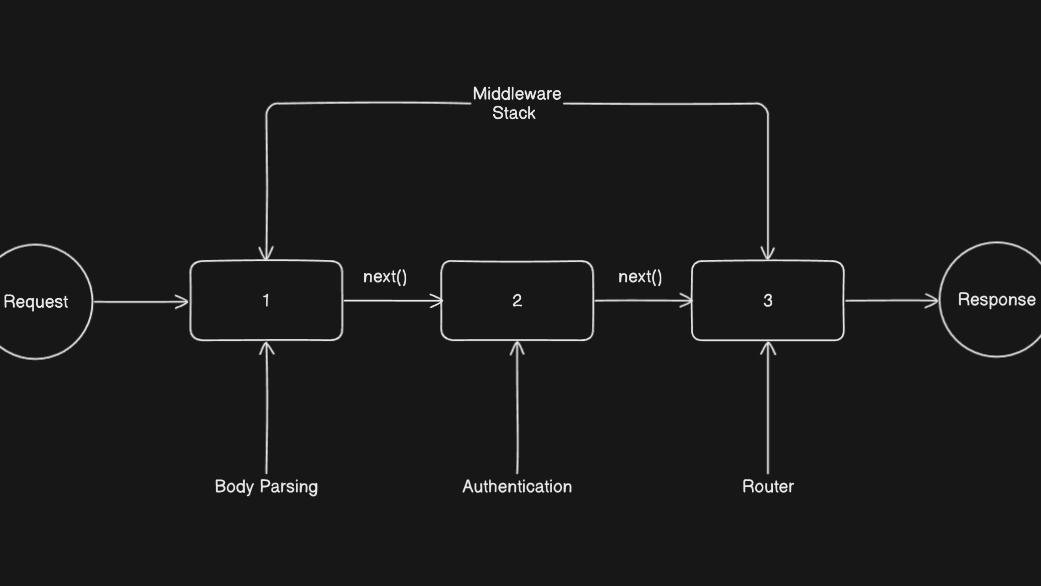
🌐 Middleware chain (Logging → Auth → Validation)
📄 Approval systems (Manager → Director → CEO)
🛡️ Request filters in web servers
🎯 One-Line Definition
Chain of Responsibility = Pass request until someone handles it.
⚡ Interview Tip
Q: When to use Chain of Responsibility?
A: When multiple objects can handle a request and you want to process it sequentially.
⚙️ Design Patterns in Real Systems (LLD)
- Singleton → Database connection
- Factory → Object creation
- Observer → Notifications
- Strategy → Payment selection
🧠 When Should You Use Design Patterns?
- When code becomes complex
- When you see repeated problems
- When scalability is needed
🚫 When NOT to Use Them
- For very simple problems
- Just to show off in interviews
📌 Final Summary
Design patterns help you write better, cleaner, and scalable code. Start small, understand concepts, and apply them gradually.